

 EN
EN

Joystick Module

Many robot projects need a joystick controller. The upgraded Arduino analog and digital joystick module provides a simple and user-friendly solution. By connecting to two analog inputs, the robot can be controlled by X, Y axes according to your commands. It also features a push button switch that connects to a digital pin. This joystick module is an ideal choice for controlling small robots, arm movements, or controlling remote devices. The spring auto-return feature makes it easy to operate and has a stable performance that is suitable for extended use. With a compact design and easy-to-mount layout, this Arduino joystick module is perfect for a variety of robotic and DIY projects.
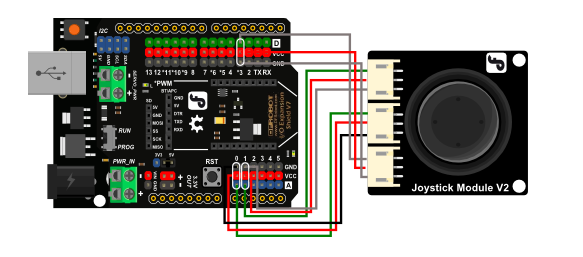
Figure: Wiring Diagram of Joystick Module and Arduino UNO
This joystick module is compatible with common controllers such as Arduino, micro:bit, ESP32, Raspberry Pi, and Raspberry Pi Pico. It can be easily connected to Arduino by IO Expansion Shield with supplied cables.
If you are a beginner, it is recommended to purchase an Arduino kit with tutorials, such as the Gravity: Intermediate Kit for Arduino and the Gravity: Science Data Acquisition Module Kit for Experiments Education. These kits come with comprehensive tutorials and all the components necessary to complete a variety of projects, allowing you to gradually learn and build upon your knowledge and skills.
Features- Wide voltage range from 3.3V to 5V
- Standard assembling structure (two 3mm holes with multiple of 5cm as interval)
- Easily recognitive interfaces of sensors ("A" for analog and "D" for digital)
- Concise icons describing sensor functions
- High-quality connectors with good durability against repeated plugging and unplugging
- Immersion gold surface
- Supply Voltage: 3.3V to 5V
- Compatible Controllers:
- Arduino Series
- ESP32 Series
- Raspberry Pi Pico
- Raspberry Pi (Requires ADC extension)
- micro:bit
- UNIHIKER
- Interface: Analog x2,Digital x1
- Size:39 x 35 x 30mm
- Joystick Module V2 x1
Project 1: micro:bit Missile Launcher
Introduction: This article will explain how to make a cool Missile Launcher
Project 2: Arduino Leonardo as a Mouse
Introduction: This particular example uses a pushbutton to turn on and off mouse control with a joystick.